
Few things are more frustrating during a critical virtual meeting than realizing you look washed out, shadowed, or grainy on camera. In today's hybrid work landscape, your digital presence directly impacts your professional credibility. Securing the right illumination environment is the ultimate bridge to projecting authority, granting you an immediate boost in on-camera confidence and clarity.
However, lighting is rarely one-size-fits-all; the ideal solution depends heavily on your workspace layout. For instance, while an asymmetrical monitor bar like the BenQ ScreenBar excels at glare-free desk coverage, a dedicated 10-inch LED ring light is designed specifically to flatter the face. To help you optimize your setup, this guide compares monitor light bars and ring lights across key metrics-including eye strain, desk footprint, and illumination quality-to determine which tool best elevates your video conferencing game.
Introduction: The Battle for the Perfect Video Call Lighting
In the era of remote work and virtual meetings, your professional appearance is often defined by the quality of your webcam feed. We have all experienced the dread of joining a crucial video conference only to realize our face is shrouded in shadows or washed out by harsh overhead bulbs. Finding the right balance of illumination has become a daily struggle for professionals, educators, and creators alike. Two main contenders have emerged to solve this dilemma: the sleek, modern monitor light bar and the trusty, ubiquitous ring light. Each offers a distinct approach to illuminating your workspace and enhancing your on-camera presence.
Understanding Monitor Light Bars: Sleek and Space-Saving
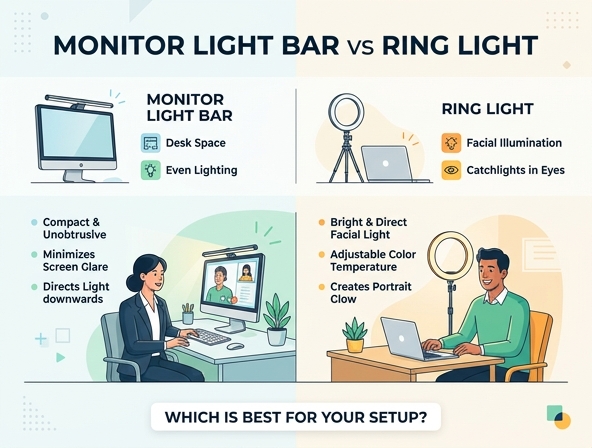
A monitor light bar is a slim, linear light fixture designed to sit directly on top of your computer monitor. Utilizing a gravity-based counterweight or a secure clip-on mechanism, it mounts easily to the upper bezel of almost any screen. Its primary design purpose is to cast a clean, asymmetric pool of light directly onto your desk workspace without bouncing light off the screen itself. By focusing the illumination downwards, it keeps your desk well-lit while maintaining a zero-glare viewing experience on your monitor.
The Pros and Cons of Monitor Light Bars for Video Calls
While monitor light bars are excellent productivity tools, they present a unique set of trade-offs when repurposed for video conferencing.
- Pros: Space-saving design that completely frees up desk real estate.
- Pros: Asymmetric light path ensures there is no glare on your screen.
- Cons: The downward light angle can create shadows on your face during calls.
- Cons: It does not offer direct, front-facing illumination for the eyes.
Understanding Ring Lights: The Content Creator's Standard
A ring light is a circular lighting tool that houses a continuous strip of LEDs inside a hoop-shaped frame. This specific circular design allows users to position their camera or smartphone directly in the center of the ring, ensuring light wraps evenly around the lens. Traditionally, it has been the go-to tool for front-facing illumination because it minimizes shadows and creates a flattering, soft glow. For creators and professionals who need their features to look clear and vibrant, a ring light provides outstanding facial clarity that is hard to replicate with standard desk lamps.
The Pros and Cons of Ring Lights for Video Calls
Ring lights are highly effective for direct camera work, but they also come with physical and visual drawbacks for everyday office use.
- Pros: Deliver perfectly even and flattering front-facing facial lighting.
- Pros: Highly customizable angles and height adjustments with adjustable stands.
- Cons: Possess a bulky footprint that takes up valuable desk or floor space.
- Cons: Can cause distracting circular reflections in eyeglasses.
- Cons: Direct, bright light pointing at your face can accelerate eye fatigue during long meetings.
Face-to-Face Comparison: Lighting Quality and Aesthetics
When evaluated solely on how they make you look on camera, the ring light and the monitor light bar offer starkly different results. A ring light provides direct, diffused illumination that fills in wrinkles, evens out skin tones, and eliminates harsh facial shadows. Because the light source is level with your eyes, it keeps your face looking bright and highly engaging. On the other hand, a monitor light bar illuminates you indirectly. Because the light source is positioned above your screen and angled downward, it can cast soft shadows beneath your brow and chin, making your overall appearance on camera look less balanced than it would under a dedicated front-facing light.
While a monitor light bar is optimized for lighting your desk, a ring light is engineered specifically to make your face look its best on camera.
Desk Ergonomics: Space, Setup, and Clutter
Workspace real estate is a precious commodity, especially in compact home offices. A monitor light bar is the undisputed champion of desk ergonomics, clamping onto your display and requiring zero desk footprint. It integrates seamlessly into your workstation, keeping cables hidden behind the monitor and preserving a clean, minimalist aesthetic. Conversely, ring lights are notoriously bulky. Even smaller desk-clamp models require a mounting arm, while standalone versions rely on heavy tripods that clutter your physical workspace and disrupt a streamlined room aesthetic.
Eye Strain and Screen Glare: Protecting Your Vision
Staring at screens for hours can lead to severe ocular fatigue, making your choice of lighting critical for your long-term health. Monitor light bars are carefully engineered with asymmetric optics that project light down and forward, ensuring no light beams bounce off your screen into your eyes. This drastically reduces glare and eases eye strain during long document editing or coding sessions. Ring lights, however, project light directly forward. While this is great for the camera, it means you must stare directly into a bright circular light source, which can quickly cause dry eyes and fatigue, especially if you wear prescription eyeglasses that reflect the circular light rings.
The Decision Matrix: Which Light is Best for Your Specific Needs?
Choosing between these two lighting options depends on your primary daily activities and workspace limitations.
Scenario One: Choose the Monitor Light Bar
This option is best if you prioritize productivity, have a small desk, want to prevent screen glare, and wear glasses regularly.
Scenario Two: Choose the Ring Light
This option is best if your day is filled with high-stakes video calls, you create video content, or you need highly adjustable angles.
Final Verdict: Brightening Up Your Home Office
Your choice between a monitor light bar and a ring light comes down to your personal workflow priorities. If your focus is on maintaining an organized workspace, reducing eye strain, and general productivity, the monitor light bar is an exceptional addition to your desk. However, if your professional success relies heavily on your on-camera appearance, facial clarity, and video presentation quality, investing in a ring light is the clear path forward. By selecting the tool that aligns with your daily habits, you can build a more comfortable, functional, and professionally lit home office.
Leave a comment