
Nothing ruins the clean aesthetic of a modern home office faster than a chaotic tangle of wires dangling beneath your workstation. As remote work establishes itself as a permanent lifestyle, maintaining an organized environment has transitioned from a mere design preference to a functional necessity.
An efficient cable management system does more than clear physical clutter; it grants mental clarity and enhances daily productivity. However, proper organization requires a tailored approach. Managing your expectations means understanding that your specific desk material and cable volume dictate your needs; for instance, a setup designed to secure a heavy power strip under a solid wood desktop will differ vastly from one suited for a dynamic standing desk.
In this guide, we will compare the two premier solutions for under-desk organization: cord covers and J-channels. By evaluating their installation complexity, capacity, and accessibility, you will discover the exact tool needed to achieve a pristine, professional workspace.
Introduction: The Battle Against Under-Desk Cable Clutter
A messy home office workspace is incredibly frustrating. Tangled power strips, dangling monitor cords, and stray USB lines create a visual nightmare that kills productivity and ruins the look of your room. Cord covers and J-channels represent the two best tools available to reclaim control over your under-desk cable chaos and restore order to your workspace.
Understanding Cord Covers: Features and Functionality
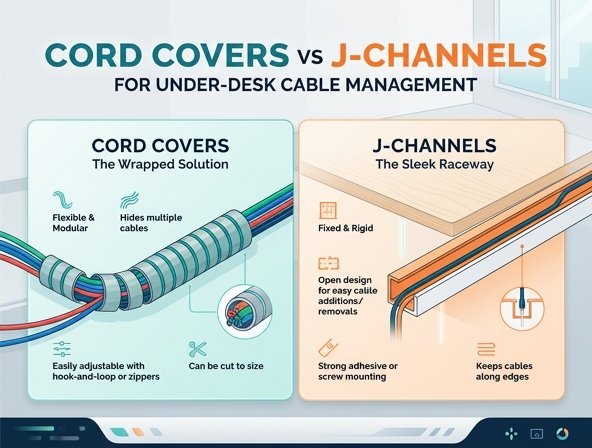
Cord covers, also known as cable sleeves or wraps, are flexible tubes designed to bundle multiple loose wires together into a single organized trunk. They wrap snugly around your existing cables to compress them into a neat profile.
Typical materials include:
- Flexible neoprene, which often zips or uses hook-and-loop fasteners for easy closing
- Braided PET fabric that naturally self-closes around cord bundles
- Flexible spiral plastic tubing that lets you route individual cords out at custom intervals
Exploring J-Channels: Design and Purpose
J-channels are rigid cable organizers designed specifically to mount onto flat surfaces, such as the underside or back of a desk. Named after their distinctive J-shaped cross-section, they act as an open tray where wires can lie flat and hidden.
Key characteristics include:
- Rigid plastic construction that prevents thick cables from sagging
- An open top slot that allows cords to slide in and out easily
- Strong pre-applied adhesive backing or pre-drilled holes for secure mounting
Installation Showdown: Adhesive vs. Screws vs. Wraps
Setting Up Cord Covers
Cord covers require zero tools for installation. You simply gather your cables and wrap the sleeve around them, securing it with a zipper or integrated hook-and-loop strip. Since they do not attach directly to the desk, they can be set up in minutes without any risk of damaging your furniture surface.
Mounting J-Channels
J-channels are typically installed using high-strength adhesive tape or small wood screws. Peeling and sticking the adhesive backing under the desk is quick, but you must ensure the surface is clean. While mounting with screws requires a drill, it provides a much more secure hold that won't fail under the weight of heavy power bricks.
Cable Capacity and Accessibility: Managing Future Upgrades
Capacity for Thick Cables
J-channels offer a spacious channel that easily holds *multiple thick power cords* and heavy HDMI cables without bulging. Cord covers, while expandable, can quickly become tight and difficult to close when stuffed with chunky wires.
Adding and Removing Devices
When it comes to future upgrades, J-channels are *highly convenient*. You can drop a new cable directly into the open top of the channel in seconds. To add a new cord to a sleeve, you must unzip or unwrap the *entire length* of the cover, making fast adjustments much more tedious.
Aesthetics and Cleanliness: Achieving the Minimalist Look
Visual clutter affects peace of mind. J-channels hide cords completely inside a rigid, opaque channel, tucking them out of sight. Since they mount directly flush to the underside of the desk, they remain invisible from normal viewing angles.
Cord covers do not hide cables completely; instead, they bundle them into a single, neat tube. While this looks much cleaner than loose wires, the wrapped bundle is still visible as it hangs down. Furthermore, fabric and neoprene covers tend to accumulate dust and pet hair quickly, requiring occasional cleaning to maintain a pristine appearance.
When to Choose Cord Covers: Ideal Scenarios
Cord covers are highly adaptable and thrive in specific environments where flexibility is paramount.
Use cord covers for:
- Height-adjustable standing desks, as the flexible sleeve moves freely without pulling on connections
- Cables that must drop straight down from the desktop to a floor-mounted wall outlet
- Renters who want to avoid sticking heavy adhesive or drilling screws into their desks
When to Choose J-Channels: Best Environments
J-channels are the heavy-duty workhorses of desk wire management, perfect for static, permanent setups.
Use J-channels for:
- Solid wooden desks with plenty of flat surface area underneath for mounting
- Heavy desktop setups with multiple monitors, external drives, and large power strips
- Configurations where you frequently swap out peripherals, keyboards, or charging cables
Quick Comparison: Cord Covers vs. J-Channels at a Glance
| Feature | Cord Covers | J-Channels |
|---|---|---|
| Cost | Low | Moderate |
| Capacity | Moderate | High |
| Installation Ease | Very Easy | Moderate (Requires Mounting) |
| Flexibility | High | Low (Rigid) |
Final Verdict: Choosing the Right Solution for Your Desk
Selecting the right wire management tool depends on your desk type and how often you change your gear. If you prioritize *maximum flexibility* and have a height-adjustable standing desk, cord covers are your best bet. If you want a *hidden, minimalist look* for a stationary workstation and need room for expansion, J-channels are the superior choice. Assess your workspace requirements today to build a clean, distraction-free home office.
Leave a comment