
Struggling with a cluttered home office desk and persistent neck strain is a frustratingly common hurdle for remote professionals. While upgrading to an ergonomic monitor arm is the logical next step to optimize your workstation, choosing the wrong mounting style can lead to instability or even permanently damage your furniture.
Securing the right mount yields immediate benefits-maximizing your desktop real estate while achieving perfect, eye-level viewing angles. However, success hinges on one crucial stipulation: you must evaluate your desk's structural limits, as material type and thickness dictate your options. For instance, mounting a heavy ultrawide screen on a fragile tempered glass desk requires a vastly different approach than securing a dual-monitor setup to a solid oak tabletop.
To ensure your setup is both safe and functional, this guide will directly compare clamp-on and grommet mounts across stability, installation ease, and desk compatibility to help you select the ideal support system for your workspace.
Introduction: Upgrading Your Ergonomics
Creating a comfortable, efficient workspace starts with proper desk ergonomics, and a high-quality monitor arm is an essential tool for achieving the perfect viewing angle. By elevating your screen, you instantly free up valuable desktop real estate while reducing neck strain and shoulder fatigue. However, before reaping these benefits, you must face a crucial installation decision: the clamp-on versus grommet mount debate. Both options offer distinct methods for securing your screen, and choosing the wrong one can lead to desk damage or unstable displays. This comprehensive guide will help you evaluate your specific workspace needs so you can make the right choice for your home office.
Understanding the Clamp-On Mount
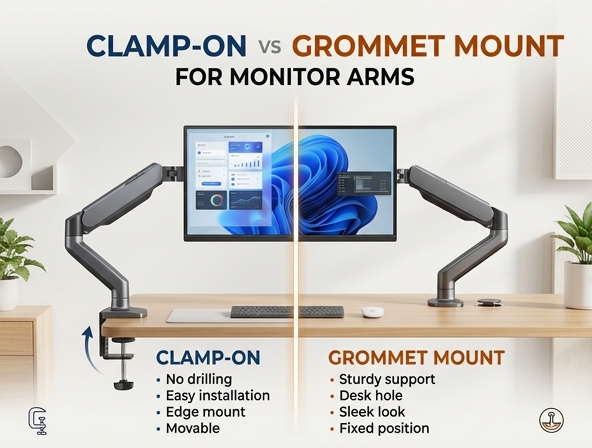
A clamp-on monitor arm is a versatile desk accessory designed to mount directly to the outer edges of your workstation without requiring permanent alterations. This mounting style utilizes an adjustable C-clamp mechanism that tightens securely against the top and underside of the desk surface. By turning a hand knob or integrated screw, the bracket pinches the desk edge to create a stable anchor point. The ideal setup for this mounting type is a flat, sturdy desk with an exposed, rectangular perimeter. It requires ample clearance underneath the desk surface and an edge free from support beams or modesty panels that could block the clamp.
The Advantages of Clamp-On Mounts
For many home office workers, clamp-on mounts represent the most convenient and practical choice. Here are the key benefits of opting for this mounting style:
- Effortless Installation: Setting up a clamp-on arm requires no power tools or drilling, allowing you to secure your monitor in just a few minutes.
- Damage-Free Removal: Since no holes are drilled into the surface, your desk remains pristine, making this an ideal option for expensive furniture.
- Exceptional Portability: If you decide to rearrange your workspace or transition to a new desk, you can easily loosen the clamp and reposition the entire setup.
The Limitations of Clamp-On Mounts
While highly convenient, clamp-on monitor arms are not suitable for every single workstation. Understanding these drawbacks is essential before purchasing:
- Strict Edge Requirements: Desks with beveled edges, decorative trim, or bottom-facing support bars often cannot accommodate a standard C-clamp.
- Material Vulnerability: Heavy clamping force can crack glass desktops or crush cheap hollow-core wood under the weight of a monitor.
- Aesthetic Bulkiness: The mounting bracket must sit on the edge of your desk, which can look visually cluttered or prevent you from pushing your desk completely flush against a wall.
Understanding the Grommet Mount
A grommet monitor arm mount is a heavy-duty mounting solution that secures the arm through a dedicated hole in the desktop surface rather than wrapping around the edge. This method utilizes existing cable-management grommet holes that are already built into many standard office desks, but it can also be installed by drilling a custom hole directly through the desktop. The mechanism functions by threading a threaded bolt or rod through the top of the mount, passing it down through the hole, and locking it securely from beneath using a flat metal plate and a heavy-duty wingnut. This creates an incredibly secure, balanced anchor that distributes the monitor weight evenly across the desk surface.
The Advantages of Grommet Mounts
Grommet mounts are often favored by power users and design enthusiasts for several compelling reasons:
- Superior Structural Stability: By anchoring directly through the desk, grommet mounts offer unmatched weight distribution, minimizing screen wobble and tilt.
- Unrestricted Placement: You are not restricted to the desk edge; you can position your monitor mount anywhere on the desktop where a hole can be placed.
- Clean and Streamlined Aesthetic: Passing cables and mounting hardware directly through the desk surface creates a sleek, minimal, and highly professional appearance.
The Limitations of Grommet Mounts
Despite their superior stability, grommet mounts present a few significant trade-offs that you must consider:
- Permanent Desk Damage: If your desk does not already have a built-in grommet hole, you will have to permanently drill through your desktop, which cannot be easily repaired.
- Requirement for Special Tools: Installation often requires a power drill, appropriate drill bits, and precise measurements, making the setup process more complex.
- Lack of Flexibility: Moving your monitor arm to a different position requires drilling a new hole, leaving the previous hole exposed and unsightly.
Evaluating Your Desk Material and Design
Before purchasing either mounting style, you must thoroughly evaluate your workspace furniture to avoid damaging your investment. Start by measuring your desk thickness; most clamp-on and grommet mounts require a thickness between 0.5 inches and 3.5 inches to secure properly.
Next, inspect the material composition of your desktop. Solid wood, thick metal, and high-density MDF are excellent candidates for both clamp-on and grommet mounts due to their structural integrity. However, tempered glass desks are extremely fragile and should never be used with standard clamp-on mounts unless specified by the manufacturer. Similarly, hollow-core desks require caution, as the internal cardboard structure can easily collapse under concentrated pressure.
Finally, examine the under-desk structure. Look for metal support ribs, cable trays, or modesty panels that might block a C-clamp from gripping the edge. If your desk has a beveled or curved edge, a grommet mount is often the safer, more secure option.
Side-by-Side Comparison: Clamp-On vs. Grommet
| Feature | Clamp-On Mount | Grommet Mount |
|---|---|---|
| Installation Time | Fast (5 to 10 minutes) | Moderate (15 to 30 minutes if drilling) |
| Desk Damage Risk | None (protects desk surfaces) | High (requires a permanent hole) |
| Flexibility and Mobility | High (easy to reposition or move) | Low (permanent placement) |
| Weight Capacity and Stability | Good (suitable for light to medium screens) | Excellent (ideal for heavy or multi-monitor setups) |
Final Verdict: Which Mount Is Best for Your Home Office?
Choosing the perfect mounting system comes down to your personal living situation, design aesthetic, and workspace material. If you are a renter, own an expensive glass desk, or value the flexibility to rearrange your workspace frequently, a clamp-on monitor arm is your ideal choice. It offers simple, non-destructive installation that keeps your furniture pristine.
On the other hand, if you want maximum stability for a heavy multi-screen display, have a sturdy wood desk, or prefer a clean workspace layout with hidden wires, a grommet monitor arm is the superior option. Assess your current desk structure today, explore our collection of high-quality ergonomic monitor arms, and elevate your health to the next level.
Leave a comment