
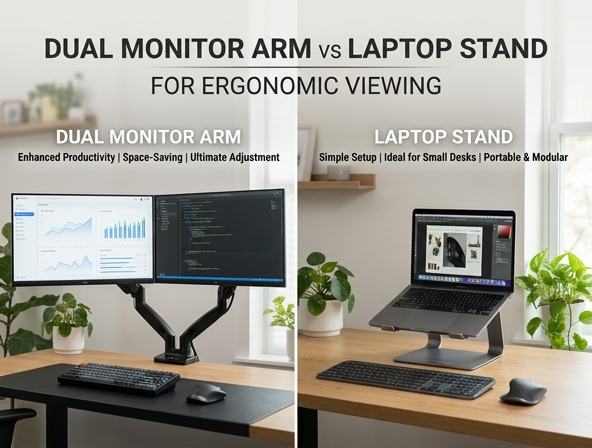
Many remote professionals quietly endure chronic neck strain and desk clutter, struggling to remain focused during long working hours. As the home office transitions from a temporary setup to a permanent headquarters, the physical toll of a poorly configured workspace becomes impossible to ignore.
Investing in proper ergonomics does more than alleviate discomfort; it actively reclaims valuable desk real estate and sharpens your cognitive focus. However, ergonomic optimization is rarely a one-size-fits-all endeavor. Your ideal configuration depends entirely on your specific workflow-whether that requires the heavy-duty articulation of a gas-spring dual monitor arm for twin 27-inch screens, or the compact portability of an angled aluminum laptop stand.
This comprehensive comparison evaluates both solutions across key criteria, including adjustability, space efficiency, and cost, helping you determine the ultimate hardware setup for your health and productivity.
Introduction: The Modern Home Office Struggle
The rise of remote and hybrid work has transformed kitchen tables, spare bedrooms, and dedicated studies into permanent professional hubs. As professionals spend eight or more hours daily tethered to their computers, the physical toll of a poorly configured workstation becomes impossible to ignore. This shift has sparked a crucial debate in the workstation community: should you invest in a dual monitor arm or a laptop stand? Both promise to rescue you from the clutches of poor posture, but choosing the right tool requires balancing your specific workflow, space constraints, and ergonomic needs to achieve the perfect workspace configuration.
What is a Dual Monitor Arm?
A dual monitor arm is a heavy-duty, mechanical bracket system that secures two computer monitors and suspends them above your desktop surface. Typically mounted using a robust C-clamp or a grommet hole drilled directly through the desk, these arms utilize gas-spring or mechanical-spring tension to support substantial weight. By lifting the screens off the desk surface, a dual monitor arm dramatically expands your usable workspace while facilitating high-efficiency multitasking across multiple applications.
- C-Clamp or Grommet Mount: Secures the base firmly to the edge or interior of your desk without requiring permanent structural alterations.
- Heavy-Duty Load Capacity: Engineered to hold two screens ranging from 17 to 32 inches each, preventing sagging or shaking.
- Independent Articulation: Allows each screen to be moved, tilted, or rotated separately for tailor-made viewing angles.
What is a Laptop Stand?
A laptop stand is a straightforward, elevated platform designed to raise your portable computer off the flat surface of your desk. By bringing the top of your laptop screen closer to eye level, it prevents the harmful habit of slouching forward and hunching over your keyboard. Unlike bulky mounting systems, these stands represent the pinnacle of simplicity and mobility, allowing users to pack up their ergonomic setup and recreate a healthy workspace anywhere from a local coffee shop to a corporate hot-desk.
Ergonomic Face-Off: Neck Strain and Eye Level
The primary battleground between these two devices is physical health. When you look downward at a screen, your head effectively exerts extra weight on your spine, leading to chronic cervical spine strain and debilitating neck pain. A laptop stand corrects this by elevating your singular, smaller screen, but it still requires an external keyboard and mouse to prevent wrist strain. Conversely, a dual monitor arm offers a superior ergonomic posture upgrade because it supports two large displays at the precise height and distance needed to maintain natural eye-level alignment, completely eliminating the need to tilt your chin downward or crane your neck forward during long work sessions.
Maximizing Desk Real Estate and Organization
Physical space is a premium resource on any desk. A dual monitor arm acts as a space-saving powerhouse by levitating your screens completely off the desk surface, leaving the entire tabletop open for notebooks, documents, and coffee mugs. In contrast, a traditional laptop stand occupies a persistent physical footprint on your desk surface, keeping the area directly beneath the laptop partially restricted. While some stands offer hollow bases to store a keyboard, they cannot match the total freedom of an elevated arm system.
Adjustability, Versatility, and Screen Sharing
When it comes to movement, the differences are stark. Gas-spring dual monitor arms offer effortless, fluid articulation, allowing you to tilt, swivel, and rotate your screens from landscape to portrait orientation with a gentle touch. This is incredibly helpful when sharing your screen with a colleague across the desk. Laptop stands, while sometimes height-adjustable, typically offer a more static, manually locked position that is less convenient to readjust throughout the day.
"Dynamic adjustability in office equipment is not just a luxury; it is a necessity for preventing static muscle fatigue. Being able to shift your screens even a few inches during the day redistributes physical stress and keeps your body engaged." - Dr. Evelyn Vance, Ergonomic Design Specialist
Cost, Portability, and Ease of Installation
Your budget and lifestyle play a major role in this decision. Laptop stands are highly affordable and offer a true plug-and-play experience-you simply unbox, unfold, and place them on your desk without any tools. Dual monitor arms demand a more significant financial investment and require careful installation, tension tuning, and desk assessment to ensure your desk can handle the clamped load.
*Disclaimer: Always check your desk material before installing a dual monitor arm. Glass, hollow-core, and paper-veneer desks may crack or collapse under the heavy clamping pressure of a dual mount.*The Ultimate Hybrid: Combining Both Worlds
You do not override your options by choosing just one approach. Many modern professionals opt for a dual monitor arm configured with a specialized laptop tray attachment on one side. This hybrid setup allows you to mount a primary desktop monitor on one arm while suspending your laptop on the other, creating a highly efficient, cohesive multi-screen powerhouse. By elevating both screens to the exact same visual plane, you unlock massive productivity gains and maintain seamless, ergonomic focus across both operating environments.
Decision Guide: Which One is Right for You?
To help you narrow down your selection, evaluate your daily workflow, equipment preferences, and work environment against the quick guide below.
- The On-The-Go Professional
- Choose a laptop stand if you frequently rotate workspaces, travel, or work from coffee shops, as its lightweight frame fits easily into a backpack.
- The Heavy Multitasker
- Choose a dual monitor arm if you run multiple data-heavy programs, need to reference documents side-by-side, and work from a permanent home office desk.
- The Compact Desk Owner
- Choose a dual monitor arm to clear your desktop surface completely, creating valuable physical space on small or narrow writing desks.
- The Budget-Conscious Remote Worker
- Choose a laptop stand for an immediate, affordable, and zero-tool-required ergonomic upgrade that instantly improves your seated posture.
Conclusion: Elevating Your Workday Health
The perfect workspace is a deeply personal configuration tailored to your daily routines, physical comfort, and task demands. Choosing between a dual monitor arm and a laptop stand comes down to your need for mobility versus your desire for extensive screen real estate and maximum desk space. Whichever path you select, making a conscious investment in your physical well-being today will safeguard your posture, boost your energy levels, and enhance your productivity for years to come.
Leave a comment