
As home offices have evolved from temporary setups into permanent productivity hubs, many professionals face a frustrating, tangled reality: a chaotic nest of cords dangling beneath their desks. This visual clutter is more than an eyesore; it is a persistent mental distraction that actively disrupts daily focus.
Tackling this mess grants immediate mental clarity and elevates your workspace's overall design, transforming a chaotic desk into a streamlined, high-performance environment. However, successful organization requires recognizing that cable management is not a one-size-fits-all endeavor. The ideal setup depends on your specific hardware-whether you must route stiff HDMI cables, secure bulky laptop power bricks, or accommodate the vertical movement of an adjustable standing desk.
To help you select the right system, this guide compares the two most popular solutions: J-channels and cable trays. We will analyze their installation methods, load capacity, and ongoing accessibility, enabling you to choose the perfect fit for your home office.
The Battle of Under-Desk Clutter: J-Channel vs. Cable Tray
Working from a home office should feel productive, inspiring, and comfortable. However, a chaotic web of tangled cords dangling beneath your workstation can instantly ruin the aesthetic and create physical hazards. The frustration of accidentally kicking a power cord loose mid-meeting is a shared nightmare for remote workers everywhere. Managing this mess is critical for both peace of mind and safety.
To conquer this chaos, two primary solutions stand out in the world of cable management: the sleek J-channel raceway and the robust under-desk cable tray. Both aim to lift your wires off the floor, but they take vastly different paths to achieve a clean setup.
Understanding the J-Channel Raceway
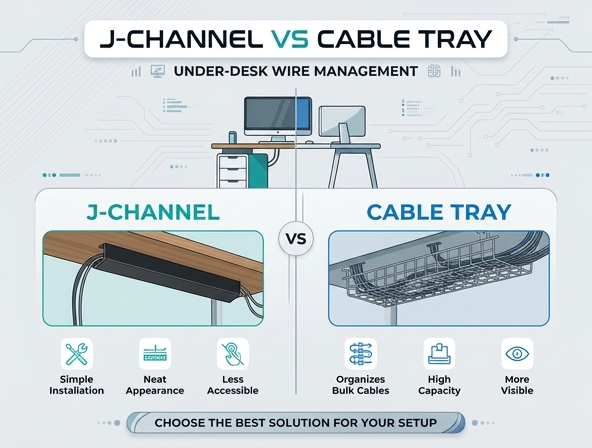
A J-channel raceway is a simple, highly effective cable organizer designed to run along the back or underside of your desk. Shaped like the letter "J", this enclosed track channels your cords horizontally or vertically, keeping them flush against flat surfaces.
- Material: Made of lightweight, durable extruded plastic (usually PVC).
- Structure: Features a distinct "J" cross-section with an open top slot for easy cable insertion.
- Mounting: Comes equipped with a strong self-adhesive tape backing for tool-free installation.
Demystifying the Under-Desk Cable Tray
An under-desk cable tray is a heavy-duty management system designed to suspend multiple cords, adapters, and power accessories. Unlike enclosed tracks, these trays act as suspended platforms that hang beneath the desk surface, providing a spacious drop-zone for all your power needs.
- Design: Constructed from rigid steel wire mesh or solid sheet metal.
- Mounting Mechanism: Secured using heavy-duty mounting brackets, wood screws, or desk-friendly clamps.
- Open Format: Provides a wide, well-ventilated basket structure to prevent heat buildup.
Installation Showdown: Easy Stick vs. Secure Screw
The No-Drill Simplicity of J-Channels
J-channels offer an incredibly approachable installation process. Utilizing a peel-and-stick adhesive backing, you simply clean the underside or back of your desk, peel the protective film, and press the channel firmly into place. This makes them ideal for renters, glass desks, or anyone who wants to avoid drilling holes in expensive wood.
The Heavy-Duty Mounting of Cable Trays
Cable trays require a bit more manual labor. Most models demand that you pre-drill pilot holes and secure heavy steel brackets directly into the underside of your desktop using wood screws. While clamp-on models exist to save your desktop from damage, screw-mounted trays offer unparalleled stability and support that adhesive strips simply cannot match.
Capacity and Bulk: Power Bricks vs. Single Wires
When it comes to volume, these two options serve completely different purposes. J-channels are highly specialized for routing single wires and thin cables. Attempting to cram a massive laptop power brick inside a narrow plastic channel is futile. Because they rely on adhesive, overloading them risks causing the entire channel to collapse under too much weight.
Conversely, cable trays are absolute beasts of burden. Their wide baskets effortlessly accommodate thick, heavy power strips, multiple bulky charging bricks, and coiled power supply units. The metal structure ensures virtually zero bending or sagging under heavy loads, making them the superior choice for power-dense setups.
Accessibility: Swapping and Re-routing Cables on the Fly
If you regularly update your tech or swap peripherals, accessibility is a major factor. The J-channel is incredibly convenient for quick swaps. Thanks to its narrow top gap, you can effortlessly slide a phone charger or USB cable in and out of the track without needing to unmount or untangle the entire line. The tension of the plastic channel keeps everything else safely tucked inside.
Cable trays offer a different kind of accessibility. Because they feature a wide-open basket design, you have full visibility of all your components. You can reach in, unplug a power brick, and plug a new one in with ease. However, because everything sits in a collective tray, managing individual cables can sometimes feel like digging through a basket unless you secure them with hook-and-loop fasteners.
Aesthetics: Out of Sight, Out of Mind
For minimalist enthusiasts, J-channels offer an unmatched, ultra-low-profile appearance. Because they fit flush against the rear of your desk legs or the back edge of the desktop, they are practically invisible from almost any viewing angle. They blend seamlessly into modern furniture designs, hiding cords in plain sight.
Cable trays, while highly functional, possess a distinctively industrial aesthetic. From certain angles, the metal mesh or hanging brackets may be visible beneath the desk. While they keep cables off the floor perfectly, they do not hide the cords from view if you happen to look under the workstation. They prioritize high-capacity organization over pure visual stealth.
Durability and Lifespan: Plastic vs. Steel
The materials you choose dictate how long your cable management system will survive. Plastic J-channels are highly functional but susceptible to environmental wear. Over several years, adhesive backing can dry out, lose its grip, and cause the channel to fall off the desk. Furthermore, cheap plastic can become brittle and crack if subjected to accidental kicks or heavy stress.
Metal cable trays are built to last a lifetime. Made of steel or aluminum, they resist bending, cracking, and environmental degradation. When mounted securely with screws, they will remain firmly attached to your desk regardless of weight or humidity changes, making them the far more durable long-term choice.
| Feature | J-Channel Raceway | Under-Desk Cable Tray |
|---|---|---|
| Primary Material | PVC / Plastic | Steel / Aluminum |
| Mounting Lifespan | Moderate (Adhesive can degrade) | Permanent (Screwed or Clamped) |
| Damage Resistance | Susceptible to cracking under stress | Highly resistant to impacts and bending |
Budget vs. Value: What is the Cost?
Budget plays a significant role in setting up a home workspace. J-channels are incredibly budget-friendly, often sold in multi-packs that can outfit several desks for a very low cost. They provide fantastic immediate value, especially for simple setups that only need to route a couple of monitor cords and a keyboard cable.
Cable trays are a larger upfront financial investment. Because they are constructed of metal and require robust mounting hardware, they carry a premium price tag. However, the value they provide over time is immense. By preventing sag, housing expensive power strips securely, and lasting through multiple desk upgrades, they represent a highly cost-effective choice for power users.
Pro-Tip: If you are on a tight budget, use J-channels to route single lines down desk legs, and invest in a single, high-quality cable tray to suspend the heavy main power hub directly beneath your desktop.
The Verdict: Which Cable Manager Wins?
Choose the J-Channel Raceway If:
Your workspace is clean, minimal, and lightweight. If you rely on a single laptop, have a glass or standing desk where drilling is not an option, and only need to route a few thin cables, the sleek profile and tool-free installation of the J-channel make it the ideal companion for your home office.
Choose the Under-Desk Cable Tray If:
You are a power user with a complex setup. If your desk features multiple monitors, studio speakers, external storage drives, and a massive power strip, you need the heavy-duty weight capacity and open ventilation of a metal cable tray to keep your hardware running safely and securely.
By matching your management tool to the complexity of your gear, you can permanently eliminate under-desk clutter and enjoy a clean, stress-free workstation.
Leave a comment